
mic not working in game? LOOK HERE!!
Hey guys,
decided to register and give some tips on how to get your mic working in-game.
I had an issue where my mic was plugged in but DayZ would not transmit my voice. My mic worked for skype, teamspeak, vent and google talk with no issues.
I found this very strange and started to investigate, I tried everything I could find on the internet to get it to work.
This is based on my findings and how I managed to get it to work finally.
First make sure:
Your using the direct communication channel in the game, this can be achieved by using the fullstop and comma key on your keyboard to chage the voice channel.
Your mic is plugged in (seems stupid but just make sure).
Your using the correct key to transmit your voice (push to talk key) in DayZ, to check what it is set to (default should be Caps Lock as far as I know) go into your settings page (after pressing escape on the keyboard) and checking your key bindings (while in DayZ). if it is working it will show a mic on the screen when u push it.
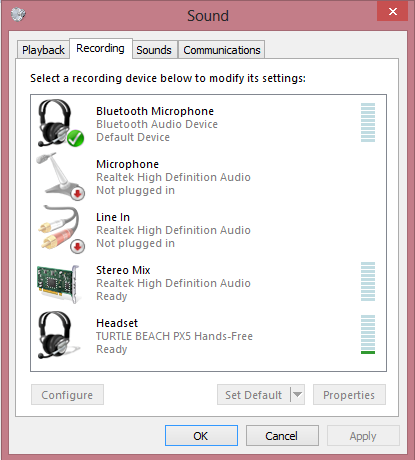
if you have done everything listed above, then lets move onto more complex solutions. Im going to list all the solutions I know of, try a combination of them or one at a time and see if they work for you: SOLUTION 1 Check that your running Arma 2:OA in administritive mode. This can be achieved by right clicking the ArmA2OA.exe and selecting "Properties", after that click on the "compatibility" tab and then under "privilege level" tick "Run this program as a administrator". If you own Arma 2 and Arma 2:OA on steam, then it will be installed in C:\Program Files (x86)\Steam\steamapps\common\arma 2 operation arrowhead. If you dont have the steam version then im sorry but I have no idea of the default location for Arma 2 when installing from a normal installer, please google this and im sure you will find the correct location. SOLUTION 2 Check that your microphone that is being used is set as Default device and Default communication device. This can be achieved by going into control panel in windows (press the windows key, it will be on the right side of the window that pops up) clicking on "Hardware and sound" then clicking on "Sound". This will bring up the sound window, click on the "recording" tab and then right click on the microphone you are using (if you have multiple then perhaps its best to unplug and rather use one). There will also be sound controllers under the recording tab, ignore them for now. Once you have right clicked on the microphone there will be a drop down box, check if you can see the words Default device and Default communication device and make sure they have a tick next to them on the left. If you cant see the words then its most likely that the device is already set as Default, if this is the case, simply right click on a sound controller under the "recording" tab and make it your default device and Default communication device, then right click on your microphone again and set it back to default the way I explained before. This is to make sure that windows has in fact registerd with all other programs that it is the default device, sometimes its listed as default but it doesnt work until you have reset it to default. Sound controllers have names like "Stereo Mix" and the microphone will be listed under the name "Microphone". SOLUTION 3 In Arma 2:OA or while in DayZ, set your microphone up so that it responds to your voice in a more sensitive way, this can be achieved by going into Arma 2:OA or DayZ Options.Once in options, click Audio Options and then click on Auto adjust, wait for auto adjust (speak loudly while its auto adjusting) to complete and then exit Arma 2:OA or DayZ and restart your computer. Good Luck and I hope this works for you! (PS: Sorry for the terrible grammer and spelling, wrote this in a rush. Thanks for your understanding!) UPDATE SOLUTION 4 Thanks to Grodenn for this one! UPDATE SOLUTION 5 Thanks to Stings2pee for this one! Here is the link for this solutions original post http://dayzmod.com/f...e-announcement/
Your mic is plugged in (seems stupid but just make sure).
Your using the correct key to transmit your voice (push to talk key) in DayZ, to check what it is set to (default should be Caps Lock as far as I know) go into your settings page (after pressing escape on the keyboard) and checking your key bindings (while in DayZ). if it is working it will show a mic on the screen when u push it.
if you have done everything listed above, then lets move onto more complex solutions. Im going to list all the solutions I know of, try a combination of them or one at a time and see if they work for you: SOLUTION 1 Check that your running Arma 2:OA in administritive mode. This can be achieved by right clicking the ArmA2OA.exe and selecting "Properties", after that click on the "compatibility" tab and then under "privilege level" tick "Run this program as a administrator". If you own Arma 2 and Arma 2:OA on steam, then it will be installed in C:\Program Files (x86)\Steam\steamapps\common\arma 2 operation arrowhead. If you dont have the steam version then im sorry but I have no idea of the default location for Arma 2 when installing from a normal installer, please google this and im sure you will find the correct location. SOLUTION 2 Check that your microphone that is being used is set as Default device and Default communication device. This can be achieved by going into control panel in windows (press the windows key, it will be on the right side of the window that pops up) clicking on "Hardware and sound" then clicking on "Sound". This will bring up the sound window, click on the "recording" tab and then right click on the microphone you are using (if you have multiple then perhaps its best to unplug and rather use one). There will also be sound controllers under the recording tab, ignore them for now. Once you have right clicked on the microphone there will be a drop down box, check if you can see the words Default device and Default communication device and make sure they have a tick next to them on the left. If you cant see the words then its most likely that the device is already set as Default, if this is the case, simply right click on a sound controller under the "recording" tab and make it your default device and Default communication device, then right click on your microphone again and set it back to default the way I explained before. This is to make sure that windows has in fact registerd with all other programs that it is the default device, sometimes its listed as default but it doesnt work until you have reset it to default. Sound controllers have names like "Stereo Mix" and the microphone will be listed under the name "Microphone". SOLUTION 3 In Arma 2:OA or while in DayZ, set your microphone up so that it responds to your voice in a more sensitive way, this can be achieved by going into Arma 2:OA or DayZ Options.Once in options, click Audio Options and then click on Auto adjust, wait for auto adjust (speak loudly while its auto adjusting) to complete and then exit Arma 2:OA or DayZ and restart your computer. Good Luck and I hope this works for you! (PS: Sorry for the terrible grammer and spelling, wrote this in a rush. Thanks for your understanding!) UPDATE SOLUTION 4 Thanks to Grodenn for this one! UPDATE SOLUTION 5 Thanks to Stings2pee for this one! Here is the link for this solutions original post http://dayzmod.com/f...e-announcement/
-
-
- 43 replies
